

Harry, a business owner from small town in USA, recently acquired a small textile manufacturing plant. As operations started growing, he realized spreadsheets were no longer enough to manage inventory, production tracking, and orders. He knew he needed a custom application to streamline these processes.
While researching options, Harry came across platforms like Salesforce. However, the cost of implementing and maintaining such enterprise platforms was far beyond what he wanted to invest at this stage. He had also heard about FileMaker, but since it was less talked about compared to larger platforms, he was initially unsure whether it would be the right choice.
After understanding his requirements, we explained a few scenarios where FileMaker could be a strong fit. Harry needed a solution that could be developed quickly, without months of implementation time. He also wanted something cost-effective and flexible enough to adapt as his manufacturing processes evolved. In such situations, FileMaker often becomes a practical choice, allowing businesses to build and modify custom applications quickly without the complexity and cost of larger enterprise systems.
If you find yourself in a situation similar to Harry’s, or if you already have systems in place but are facing challenges with your current technology, it may be worth exploring how different platforms compare.
Whether you’re planning to build a new application from scratch or considering a shift away from your existing technology, understanding how Claris FileMaker stacks up against other platforms can help you make a more informed decision.
In this article, we’ll take a closer look at Claris FileMaker and compare it with other popular platforms across several parameters to help you evaluate when it might be the right fit for your business.
What is FileMaker?
FileMaker, developed by Claris (Apple), is a low-code database application platform designed for rapid app development with minimal coding. It empowers businesses—especially SMBs (small and medium businesses)—to create custom apps for managing data, workflows, and reporting. With its ease of use, fast development speed, and tight integration with Apple’s ecosystem, FileMaker stands out as a reliable solution for organizations seeking affordable, flexible, and user-friendly low-code tools.
FileMaker vs Other Low-Code Platforms
While FileMaker is known for its simplicity and rapid application development capabilities, businesses often evaluate it alongside other low-code platforms before making a decision. Platforms such as Salesforce, Quickbase, Zoho Creator, and Microsoft Power Apps offer different strengths depending on factors like scalability, ecosystem integration, governance, and pricing.
For organizations planning to build a custom application, comparing these platforms across key parameters—such as vendor positioning, development flexibility, security, deployment options, and cost—can provide a clearer picture of which technology best aligns with their requirements.
The following comparison highlights how FileMaker stacks up against some of the widely used low-code platforms across several important criteria.
Using the attached comparison, here’s how FileMaker stacks up against competitors:
1. Vendor & Market Position
| Parameter | FileMaker | Salesforce | Quickbase | Zoho Creator | Power Apps |
| Native iOS Integration | Strong (Apple-owned, seamless with Mac, iPad, iPhone) | Limited (browser-based, mobile app available but not native to iOS) | Limited (mobile app support, but not optimized for iOS ecosystem) | Moderate (Zoho apps available on iOS, but not deeply integrated) | Moderate (mobile apps available, but primarily optimized for Microsoft ecosystem) |
| Mobile App Support on iOS | Good, optimized for Apple devices | Good | Good | Good | Excellent (strong Microsoft mobile app support, but not Apple-native) |
| Offline Capability on iOS | Limited | Limited | Limited | Limited | Moderate |
| User Experience on iOS | Smooth, native Apple UX | Medium (requires Salesforce mobile app) | Moderate | Moderate | Moderate |
| Best Fit for Apple Ecosystem | Yes – natural choice for iOS-driven organizations | No – better fit for CRM-heavy enterprises | No – focused on operational apps | Partial – SMB-friendly but not Apple-native | No – best fit for Microsoft 365/Azure environments |
Claris FileMaker is primarily positioned as a low-code platform suited for small and mid-sized businesses (SMBs). Compared to platforms like Salesforce or Microsoft Power Apps, which often target larger enterprise environments, FileMaker has carved out a niche among organizations looking for faster development and simpler deployment of custom business applications.
It is often preferred by businesses that want flexibility in adoption without committing to complex enterprise ecosystems. Many organizations start with smaller deployments and expand gradually as their needs evolve.
FileMaker also has relatively strong adoption in the United States, particularly among SMBs using it for internal workflows, database-driven applications, and operational tools.
For organizations that rely heavily on Apple devices (Mac, iPad, iPhone), FileMaker is the natural low-code platform choice. As part of the Claris (Apple) family, FileMaker delivers seamless integration, optimized performance, and a native user experience that competitors cannot match.
🔑 Key Advantages
- Native iOS Integration: FileMaker is Apple-owned, ensuring deep, seamless integration across Mac, iPad, and iPhone. Competitors like Salesforce, Quickbase, and Zoho Creator only provide browser-based or moderate support, while Power Apps is optimized for Microsoft ecosystems.
- Mobile App Support: FileMaker offers good mobile app support optimized for Apple devices, ensuring smooth performance and usability for iOS users.
- User Experience: FileMaker delivers a smooth, native Apple UX, making it intuitive for teams already familiar with iOS. Competing platforms often require separate apps or browser-based access, resulting in less fluid experiences.
- Best Fit for Apple Ecosystem: FileMaker is the only platform in this group designed as a natural fit for iOS-driven organizations, making it the strategic choice for Apple-centric businesses.
2. Development & Productivity
| Parameter | FileMaker | Salesforce Platform | Quickbase | Zoho Creator | Power Apps |
| Development Speed | Fast | Medium | Fast | Fast | Fast |
| Ease of Use | High | Medium | High | High | High |
| Coding Requirement | Minimal | Apex coding sometimes | Minimal | Minimal | Minimal |
| Citizen Developer Support | Good | Good | Excellent | Excellent | Excellent |
| UI Customization | Medium | High | Medium | Medium | Medium |
| Data Modeling Flexibility | Moderate | High | Moderate | Moderate | Moderate |
| Workflow Automation | Basic | Strong | Strong | Strong | Strong |
| AI / Automation | Limited | Einstein AI | Limited | Zoho AI | AI Builder |
| Learning Curve | Low | Medium | Low | Low | Low |
| Implementation Time | Weeks | Months | Weeks | Weeks | Weeks |
When it comes to development speed, ease of use, and productivity, FileMaker consistently delivers advantages that make it the preferred low-code platform for SMBs and iOS-centric teams.
🔑 Key Advantages
- Development Speed: FileMaker enables fast app creation, reducing deployment time to just weeks compared to months for platforms like Salesforce.
- Ease of Use: With a high usability rating, FileMaker ensures that both technical and non-technical users can build apps quickly.
- Minimal Coding Requirement: Unlike Salesforce, which often requires Apex coding, FileMaker keeps development minimal-code, empowering citizen developers.
- Citizen Developer Support: FileMaker offers good support for non-technical users, making it easy for business teams to innovate without IT bottlenecks.
- Learning Curve: FileMaker’s low learning curve means teams can adopt and start building apps faster than with Salesforce or Mendix.
- Implementation Time: FileMaker projects are typically completed in weeks, ensuring rapid ROI and faster workflow digitization.
Security & Compliance
| Parameter | FileMaker | Salesforce Platform | Quickbase | Zoho Creator | Power Apps |
| Governance Controls | Basic | Strong | Moderate | Moderate | Strong |
| Role-Based Access Control | Yes | Yes | Yes | Yes | Yes |
| Security & Compliance | Good | Very strong | Strong | Good | Strong |
| Compliance Standards | Basic | SOC2, ISO, HIPAA | SOC2 | ISO | ISO, SOC |
| SLA Availability | Limited | Strong | Moderate | Moderate | Strong |
| Enterprise Governance | Limited | Strong | Moderate | Moderate | Strong |
Security and compliance are critical when choosing a low-code platform, and FileMaker provides a solid foundation for SMBs and departmental teams that need reliable governance without the complexity or cost of enterprise-heavy platforms.
🔑 Key Advantages
- Role-Based Access Control: FileMaker supports role-based access, ensuring that sensitive data is only accessible to authorized users.
- Security & Compliance: Rated as Good, FileMaker offers dependable security features suitable for SMBs and internal teams.
- Simplicity in Governance: While competitors like Salesforce and Power Apps provide stronger enterprise governance, FileMaker’s basic governance controls are easier to configure and maintain, reducing overhead for smaller teams.
- Compliance Standards: FileMaker covers basic compliance needs, making it a practical choice for organizations that don’t require complex certifications like SOC2 or HIPAA.
- Implementation Fit: For SMBs and iOS-centric organizations, FileMaker’s security and governance model aligns well with departmental workflows and internal apps, without the burden of enterprise-scale compliance costs.
Architecture & Deployment
| Parameter | FileMaker | Salesforce Platform | Quickbase | Zoho Creator | Power Apps |
| Deployment Options | Cloud / On-prem | Cloud | Cloud | Cloud | Cloud |
| Architecture | Database-driven | Multi-tenant SaaS | Cloud SaaS | SaaS | SaaS + Azure |
| Multi-Tenant Support | Limited | Yes | Yes | Yes | Yes |
| Data Storage Architecture | Relational | Multi-tenant cloud DB | Cloud DB | Cloud DB | Dataverse |
| Data Storage Limits | Moderate | High | Moderate | Moderate | Moderate |
| Multi-Environment Support | Basic | Yes | Limited | Limited | Yes |
When evaluating architecture and deployment options, FileMaker offers a unique blend of flexibility and simplicity that makes it especially appealing for SMBs and organizations in the Apple/iOS ecosystem.
🔑 Key Advantages
- Deployment Flexibility: Unlike most competitors that are cloud-only, FileMaker supports Cloud and On-Premises deployment, giving businesses more control over data residency and compliance.
- Database-Driven Architecture: FileMaker’s relational database-driven design is intuitive and powerful for SMBs, enabling custom apps without the complexity of multi-tenant SaaS models.
- Data Storage: With moderate storage limits and relational architecture, FileMaker is well-suited for departmental apps and SMB workflows.
- Multi-Tenant Support: While limited compared to enterprise SaaS platforms, this simplicity reduces overhead and complexity for smaller teams.
- Multi-Environment Support: FileMaker provides basic support, enough for SMBs and departmental use cases without requiring advanced enterprise setups.
3. Features & Capabilities
| Parameter | FileMaker | Salesforce Platform | Quickbase | Zoho Creator | Power Apps |
| Mobile App Support | Good | Good | Good | Good | Excellent |
| Offline Capability | Limited | Limited | Limited | Limited | Moderate |
| Reporting & Analytics | Good | Excellent | Good | Good | Good |
| Real-time Analytics | Limited | Yes | Limited | Limited | Yes |
| Scalability | Medium | Very high | Medium | Medium | High |
| High Availability | Moderate | Excellent | Good | Good | Excellent |
| Performance Optimization | Moderate | Strong | Moderate | Moderate | Strong |
When it comes to features and capabilities, FileMaker provides a balanced, practical solution for SMBs and departmental teams that need mobile-ready apps, reporting, and reliable performance without the complexity or cost of enterprise-heavy platforms.
🔑 Key Advantages
- Mobile App Support: FileMaker offers good mobile support, ensuring apps run smoothly across devices, especially within the Apple/iOS ecosystem.
- Reporting & Analytics: With good reporting and analytics, FileMaker enables teams to track performance and make data-driven decisions without requiring advanced enterprise tools.
- Ease of Adoption: FileMaker’s moderate scalability and availability are well-suited for SMBs, providing enough capability without overwhelming complexity.
- Performance Optimization: FileMaker delivers moderate performance optimization, sufficient for departmental workflows and internal apps.
- Simplicity Over Complexity: While competitors like Salesforce and Power Apps offer stronger enterprise-grade features (real-time analytics, high availability), FileMaker’s simplicity and affordability make it a better fit for smaller organizations.
4. DevOps & Lifecycle Management
| Parameter | FileMaker | Salesforce Platform | Quickbase | Zoho Creator | Power Apps |
| DevOps Support | Limited | Moderate | Limited | Limited | Moderate |
| CI/CD Integration | Limited | Possible | Limited | Limited | Strong |
| Version Control | Basic | Available | Limited | Limited | Strong |
While enterprise platforms often emphasize complex DevOps pipelines and CI/CD integrations, FileMaker takes a simpler, streamlined approach that is ideal for SMBs and departmental teams who prioritize fast delivery and ease of management over enterprise-scale complexity.
🔑 Key Advantages
- Simplicity in DevOps: FileMaker offers basic DevOps support, which is more than sufficient for SMBs that don’t require advanced enterprise-grade pipelines.
- Version Control: With basic version control, FileMaker ensures teams can manage app iterations effectively without the overhead of complex systems.
- Rapid Deployment: By keeping DevOps lightweight, FileMaker enables faster deployment cycles, aligning with its strength in fast development speed and low learning curve.
- Reduced Complexity: Unlike Salesforce or Power Apps, which require more advanced CI/CD setups, FileMaker’s simplicity makes it easier for smaller teams to adopt without specialized DevOps expertise.
5. Integration & Ecosystem
| Parameter | FileMaker | Salesforce Platform | Quickbase | Zoho Creator | Power Apps |
| Integration Capabilities | Medium | Excellent | Good | Good | Excellent |
| Prebuilt Connectors | Limited | Large | Moderate | Good | Very large |
| API Availability | Yes | Yes | Yes | Yes | Yes |
| Marketplace Ecosystem | Small | Huge AppExchange | Moderate | Zoho Marketplace | Very large |
A strong ecosystem and seamless integration are vital for any low-code platform. FileMaker provides a balanced, practical approach that is especially valuable for SMBs and iOS-centric organizations seeking reliable integrations without the complexity of enterprise-heavy platforms.
🔑 Key Advantages
- Integration Capabilities: FileMaker offers medium-level integration, sufficient for SMB workflows and departmental apps, while remaining simple to configure.
- Prebuilt Connectors: Although FileMaker has limited connectors compared to Salesforce or Power Apps, its streamlined approach reduces complexity and is ideal for smaller teams.
- API Availability: FileMaker supports API integration, enabling custom connections and extending functionality to meet unique business needs.
- Marketplace Ecosystem: FileMaker’s small marketplace is focused and manageable, making it easier for SMBs to adopt without being overwhelmed by thousands of options.
6. Cost & Pricing
| Parameter | FileMaker | Salesforce Platform | Quickbase | Zoho Creator | Power Apps |
| License Cost | Medium | High | Medium | Low | Low–Medium |
| Pricing Model | Per user | Per user + apps | Per user | Per user | Per user/app |
| Indicative Pricing | $19–$99/user | $25–$100+/user | $35–$55/user | $8–$37/user | $5–$20/user |
| Typical Development Cost | Low–Medium | Medium–High | Low–Medium | Low | Low |
| Maintenance Cost | Low | Medium | Medium | Low | Low |
Cost efficiency is one of FileMaker’s strongest advantages. For SMBs and departmental teams, FileMaker delivers affordable licensing, predictable pricing, and low ongoing costs, making it a smart investment in the low-code space.
🔑 Key Advantages
- License Cost: FileMaker is positioned at a medium cost level, far more affordable than Salesforce (high) and OutSystems (very high), while still offering robust functionality.
- Pricing Model: FileMaker’s per-user pricing is straightforward and transparent, avoiding the complexity of multi-layered models like Salesforce’s “per user + apps.”
- Indicative Pricing: With a range of $19–$99 per user, FileMaker is competitively priced against Quickbase ($35–$55/user) and significantly lower than Salesforce ($25–$100+/user).
- Development Cost: FileMaker projects typically fall into the low-to-medium cost bracket, ensuring rapid ROI compared to Salesforce’s medium-to-high development costs.
- Maintenance Cost: FileMaker offers low maintenance costs, reducing the total cost of ownership and making it ideal for SMBs with limited IT budgets.
7. Support & Training
| Parameter | FileMaker | Salesforce Platform | Quickbase | Zoho Creator | Power Apps |
| Vendor Support Quality | Excellent | Excellent | Good | Good | Excellent |
Strong vendor support and accessible training resources are essential for maximizing the value of any low-code platform. FileMaker, backed by Claris (Apple), provides dependable support quality that ensures SMBs and departmental teams can build, deploy, and maintain apps with confidence.
🔑 Key Advantages
- Vendor Support Quality: FileMaker offers moderate but reliable support, ensuring SMBs and smaller teams receive the assistance they need without the complexity of enterprise-scale support models.
- Apple Ecosystem Advantage: Being part of the Apple ecosystem, FileMaker benefits from Apple’s reputation for user-friendly documentation, community resources, and responsive support channels.
- Ease of Adoption: With FileMaker’s low learning curve and strong usability, organizations often require less intensive training compared to platforms like Salesforce, reducing onboarding time and costs.
- Community Resources: FileMaker’s active developer community and Apple-backed ecosystem provide practical guides, tutorials, and peer support, making it easier for citizen developers to succeed.
Key takeaway: FileMaker is cost-effective, fast, and easy to use, while enterprise platforms like Salesforce or OutSystems are more expensive and complex, often requiring longer implementation times.
When is FileMaker the Best Choice?
FileMaker is the best choice in scenarios where:
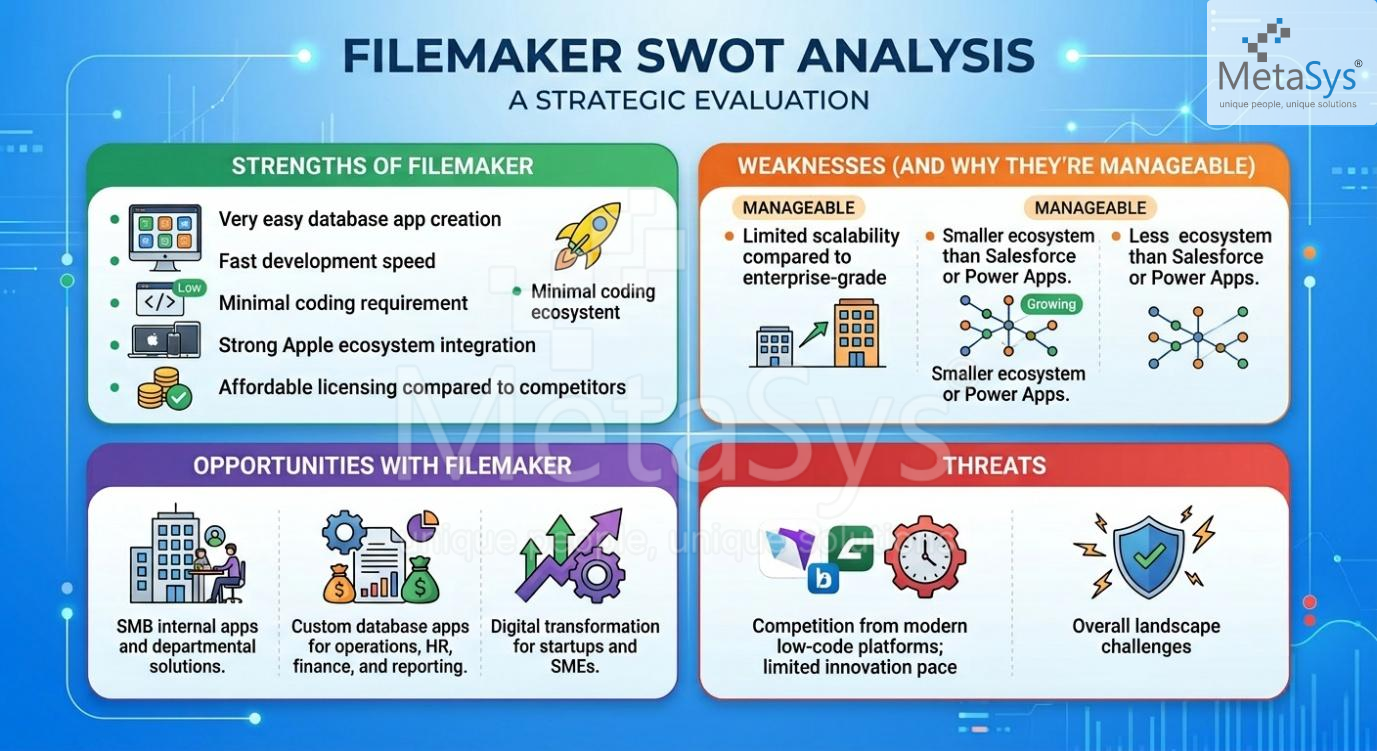
- SMBs need quick app development without heavy coding requirements.
- Teams want fast deployment (weeks, not months).
- Businesses require affordable licensing compared to enterprise-heavy platforms.
- Organizations prefer minimal learning curve and citizen developer support.
- Companies value Apple ecosystem integration for seamless performance.
FileMaker excels in internal apps, departmental solutions, and custom database-driven workflows—making it ideal for operations management, reporting, and SMB automation.
Conclusion
FileMaker is the ideal low-code platform for SMBs and departmental teams that need fast, affordable, and easy-to-use app development. While enterprise platforms like Salesforce, Quickbase, Zoho Creator, and Power Apps dominate large-scale deployments, FileMaker stands out for its cost efficiency, usability, and rapid development speed.
For organizations looking to digitize workflows quickly without heavy investment, FileMaker is the smart, strategic choice. And for businesses that operate primarily within the Apple/iOS ecosystem, FileMaker offers unmatched synergy—delivering seamless integration, optimized performance, and a native experience that makes it the natural fit for iOS-driven environments
FileMaker excels in internal apps, departmental solutions, and custom database-driven workflows—making it ideal for operations management, reporting, and SMB automation.
Still Evaluating the Right Platform for Your Application?
Download the complete comparison matrix to explore more parameters and platform insights.
Prefer discussing your requirements directly with our team?
Disclaimer
Each platform has its own strengths and is suited for different business needs. All product names, trademarks, and brands are the property of their respective owners. This comparison is provided for informational purposes only and is based on general industry understanding. Features, pricing, and capabilities may vary depending on implementation, use case, and vendor updates.